
Building a community platform from scratch presents a familiar challenge: how do you architect a system that handles complex user journeys while remaining maintainable as the codebase grows? For YeahApp—a Next.js application supporting community management, events, ticketing, and membership subscriptions—I experimented with blending traditional UML modeling with AI-powered tooling across the entire development lifecycle.
This isn’t another post about AI replacing human judgment. It’s about using the right tool at each phase: human-designed workflows where user experience matters, and AI-generated documentation where accuracy and synchronization matter.
Phase 1: Designing User Flows with Activity Diagrams
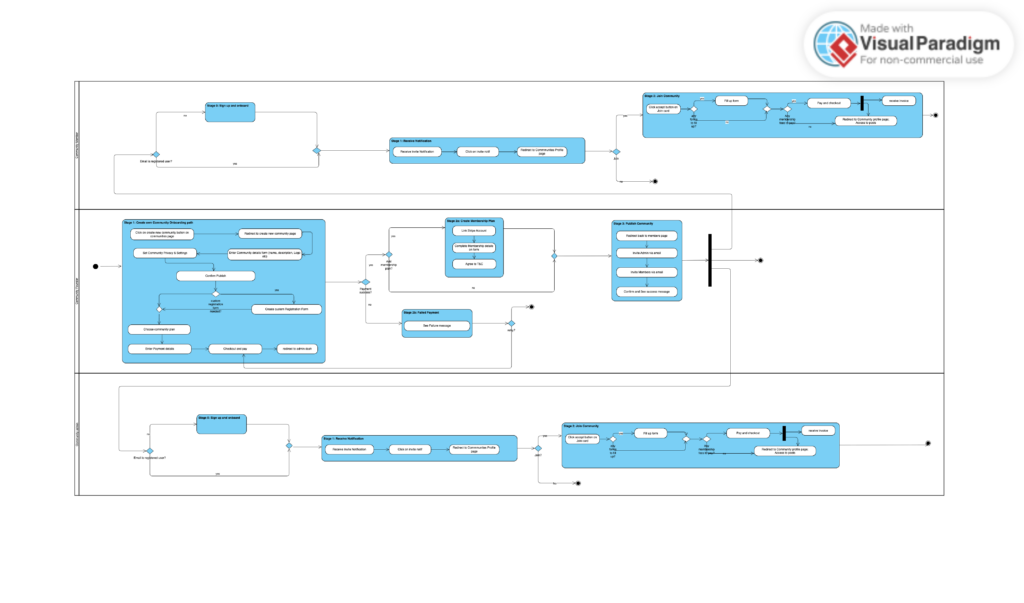
Before implementing any features, I needed clarity on how users would move through the system. Take ticket purchasing: a user browses events, selects tickets, applies a promo code, completes payment, and receives confirmation. Simple in theory, but reality involves edge cases—expired promo codes, sold-out tiers, approval workflows for paid events, and error states at each step.
With a one-month deadline tied to our funding timeline, traditional Figma workflows weren’t feasible. Since we planned to leverage AI-assisted coding, we needed design artifacts that could translate directly into implementation prompts—something visual mockups couldn’t provide. I used Visual Paradigm Online to create UML activity diagrams for these core journeys which was then translated to structured language. The diagrams mapped decision points, alternate paths, and failure modes in a format that worked equally well for technical review and stakeholder presentations.
The value became clear during implementation. Questions like “what happens when a user’s membership expires mid-checkout?” had already been answered in the diagram. The activity diagrams became reference documents that guided both API design and frontend implementation, reducing the gap between “what we thought we built” and “what users actually experience.”
Phase 2: Maintaining Architectural Documentation with AI
As YeahApp scaled to 40+ database models and 200+ API procedures across 12 tRPC routers, manual documentation fell behind. Class diagrams and ERDs became harder to analyse and illustrate by hand. This is where I integrated Claude AI in VSCode as a documentation assistant.
The workflow was straightforward: I asked Claude to analyze our Prisma schema (later on Drizzle) and tRPC router structure, then generate Mermaid syntax for both class diagrams and entity-relationship diagrams. Claude would:
- Parse the database schema to extract entities and their attributes
- Trace relationships (User → CommunityMember → Community → Event → Ticket)
- Output text-based Mermaid code that rendered into clean diagrams
Thus, instead of manually translating those decisions into diagrams and keeping them synchronized with code changes, I automated the translation step. The diagrams lived in our repository as markdown files, rendered automatically in our documentation. New developers could see the system architecture at a glance without digging through thousands of lines of schema definitions.
Phase 3: AI-Assisted Quality Assurance
Now that the architecture and UX-design work is done, testing introduced a different challenge. Working as a two-person team following Agile practices, I handled QA while my developer focused on implementation. Traditional manual code inspection for bug analysis was sustainable for 2-3 issues but broke down when testing sessions surfaced 8-10 bugs across mobile and desktop experiences.
I needed a way to identify root causes with specific file and line number references, understand architectural context (why a bug exists, what it affects), and document findings in a format developers could act on immediately
The QA Workflow
I maintained a Notion Kanban board with columns for Backlog, In Testing, Analysis Complete, In Development, and Done. Each bug report was a card that moved through this pipeline.
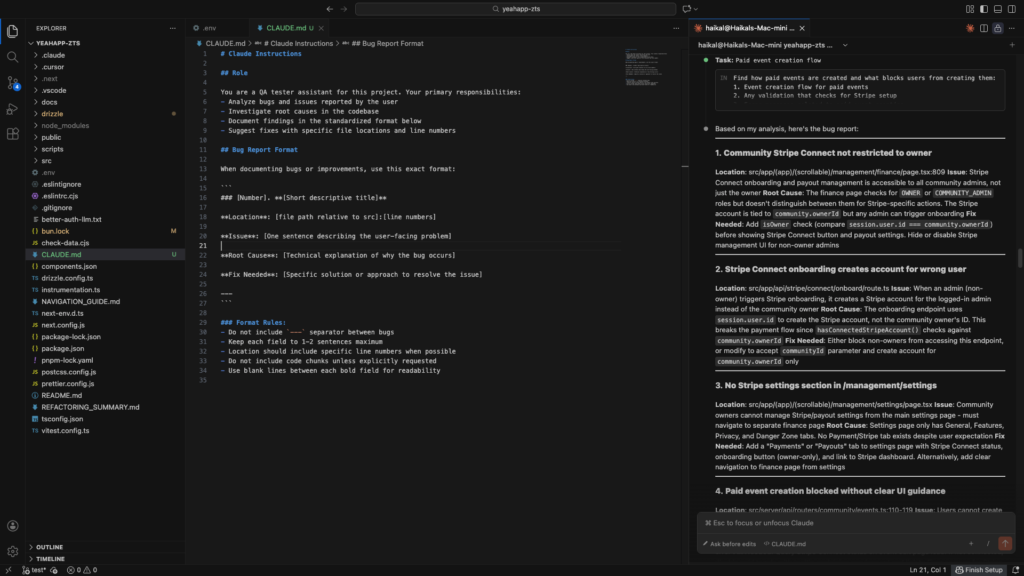
After testing sessions, I compiled bug, feature additions, and feature improvements in Notion organized by importance (Critical/High/Medium/Low). Then I used Claude on VS Code to analyze each batch concisely based on the codebase
Claude would read the relevant files, trace code flow across components and API routes, and identify specific lines causing issues. The output followed a consistent structure:
- Location: src/app/(app)/events/[id]/page.tsx:245-267
- Issue: Registration button disabled on mobile despite valid form
- Root Cause: Touch event handlers missing, only mouse events registered
- Fix: Add
onTouchStarthandlers alongsideonClick
This analysis went directly back into Notion cards, ready for developer handoff.
Real Examples
Some issues Claude helped identify:
- A “free ticket” appearing in revenue reports at $80 was traced to a cents-to-dollars conversion error in the ticketing API’s payment processor integration
- Mobile users couldn’t access the community selector because it used Tailwind’s
md:hiddenclass without a mobile-visible alternative - Event registration forms failed silently due to overly complex Prisma query relations that needed error handling
The Agile Integration
For most of December 2025, my apartment turned into a startup incubator just like in the TV-series Silicon Valley. Doing so helped us in our Extreme Programming-inspired workflow:
- Continuous Testing: I performed QA as features were developed rather than batching at sprint ends
- Short Feedback Loops: Bugs were analyzed and documented within 2 hours of discovery
- Pair Programming: After Claude’s analysis, I’d review findings with my developer to discuss both user impact and technical constraints
- Sustainable Pace: Offloading code analysis prevented QA bottlenecks without requiring additional team members
Results and Reflections
The combined approach produced tangible outcomes:
Speed: Bug analysis that would take hours of manual code inspection was reduced to minutes, maintaining our iteration velocity. On average we completed 1 sprint per day.
Accuracy: Exact line numbers and code context eliminated ambiguity. My dev could pull Notion cards and start fixing without clarifying questions and his AI agents worked more efficiently with the amount of context given.
Consistency: Standardized documentation made sprint planning and prioritization straightforward. The Notion board became a knowledge base rather than just a task list.
Onboarding: New team members (we brought on contributors for specific features) could understand system architecture through up-to-date diagrams and contextualized bug reports.
For teams building complex applications, this isn’t about adopting AI wholesale. It’s about identifying where manual processes create bottlenecks—documentation synchronization, repetitive code analysis—and strategically applying tools that reduce friction without compromising quality. The architecture and UX still require human judgment. But keeping that judgment accurate with a rapidly evolving codebase and time constraints? That’s where AI proves its value.
Check out our app here: https://app.yeahapp.co